How to do branching
Branch when the next step depends on something the run has just learned. Decide first what produces that value, because the answer changes the cost and the reliability of the branch.
Use a built-in probe when Orbital already observes the fact. The ticket workflow routes on pull request state without spending a turn asking an agent whether a merge happened. For another exact observation, use a script command with declared bool, number or text facts, and see how to add a local step. For judgement, declare an agent choice, which is what this example does.
Prerequisites
Section titled “Prerequisites”An authenticated harness and a local Git project folder.
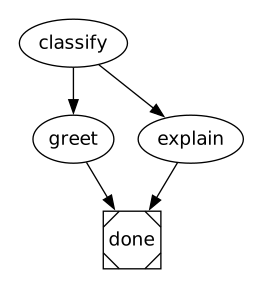
classify selects greet or explain; both reach done.
How the routing works
Section titled “How the routing works”classify declares outputs="route:choice". Orbital infers the allowed values, greet and explain, from the conditions on the node’s outgoing edges, and rejects any other answer before it reaches context. The two edges carry distinct weights, so the higher one is tried first. Because the conditions cover every inferred value, this node needs no fallback.
Add a fallback when your conditions do not cover every case, and give each conditioned edge its own weight. Two edges cannot share one.
Save, validate and run
Section titled “Save, validate and run”Download all files. Create a local Git practice repository. It needs no remote:
mkdir -p ~/orbital-conditional/.orbitalgit init ~/orbital-conditionalcd ~/orbital-conditionalExtract the archive into ~/orbital-conditional/.orbital/. Keep every relative path. From ~/orbital-conditional run:
orbital validate .orbital/workflow.dotAdd the project folder in Orbital. On New run select the project and workflow graph, choose your authenticated harness and supply the goal. Use a separate practice project for each example so the workflow name is unambiguous.
Expected behaviour
Section titled “Expected behaviour”Use a greeting goal to select greet, or another goal to select explain. Exactly one response node runs before done.
Complete source
Section titled “Complete source”Every DOT file below is a complete runnable graph. The archive contains the same files. Prompt files are companions, not separate workflows.
workflow.dot
Section titled “workflow.dot”digraph conditional { graph [version="1", entry="classify"] classify [prompt="If the goal asks for a greeting, choose greet. Otherwise choose explain.", outputs="route:choice"] greet [prompt="Write a friendly greeting. Do not use tools."] explain [prompt="Explain the goal in one sentence. Do not use tools."] done [shape="Msquare"] classify -> greet [condition="route == 'greet'", weight="2"] classify -> explain [condition="route == 'explain'", weight="1"] greet -> done explain -> done}Check error handling before reading a value produced on only one branch. Continue with how to do looping.