Simple example
The smallest workflow that does anything: one agent, one terminal. Everything else in these guides is this graph with more edges.
Prerequisites
Section titled “Prerequisites”An authenticated harness and a local Git project folder.
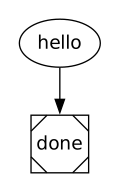
hello → done. One prompt followed by a successful terminal.
Save, validate and run
Section titled “Save, validate and run”Download all files. Create a local Git practice repository. It needs no remote:
mkdir -p ~/orbital-minimal/.orbitalgit init ~/orbital-minimalcd ~/orbital-minimalExtract the archive into ~/orbital-minimal/.orbital/. Keep every relative path. From ~/orbital-minimal run:
orbital validate .orbital/workflow.dotAdd the project folder in Orbital. On New run select the project and workflow graph, choose your authenticated harness and supply the goal. Use a separate practice project for each example so the workflow name is unambiguous.
Expected behaviour
Section titled “Expected behaviour”Set the goal to Explain what a graph is. The hello turn returns a sentence, then done ends successfully.
Complete source
Section titled “Complete source”Every DOT file below is a complete runnable graph. The archive contains the same files. Prompt files are companions, not separate workflows.
workflow.dot
Section titled “workflow.dot”digraph hello { graph [version="1", entry="hello"] hello [prompt="Reply with one sentence explaining the goal: {{ inputs.goal }}. Do not use tools or change files."] done [shape="Msquare"] hello -> done}Continue with how to do branching.