

Pass context between steps
Hand a value from one step to the next through the run's context
Hand a value from one step to a later one by declaring it as an output, then reading it from context. Context is the one store a run reads and writes as it moves through the workflow.
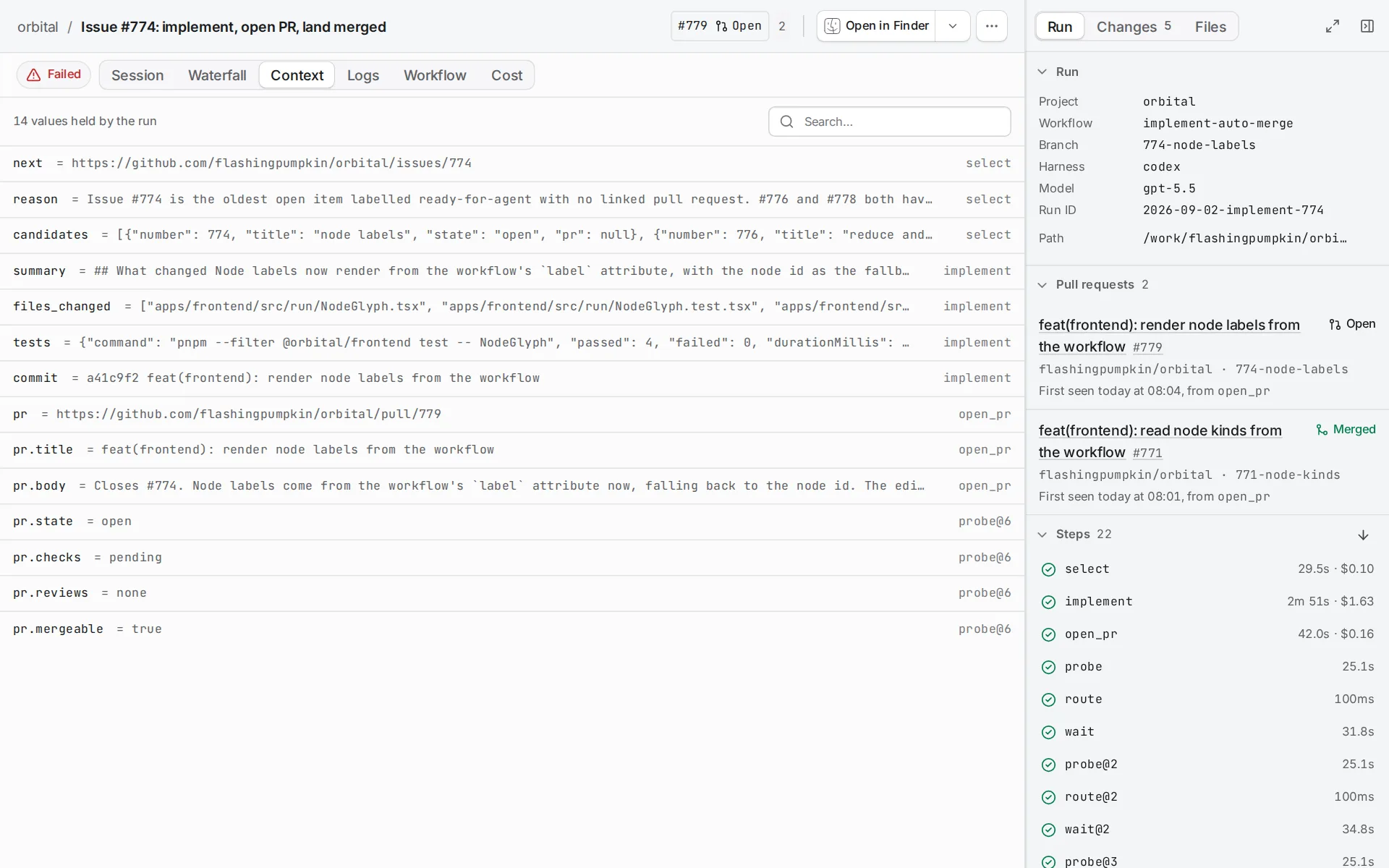
review [prompt="Review the change.", outputs="verdict:choice,findings:json"]fix [prompt="Address these findings: {{ context.findings }}"]review -> fix [condition="verdict == 'reject'", weight="1"]Context starts with the goal and the declared inputs. It then gains an entry for every accepted agent output, every command fact and each step’s outcome. Prompts read it, conditions read it, and nothing else carries information between steps.
The run page’s Context tab lists every value the run holds and the step that set it.
What goes in
Section titled “What goes in”| Source | What it adds |
|---|---|
| Declared inputs | Copied into context when the run starts. |
| An agent step | Only the outputs it declares. |
| A probe command | Per-folder facts such as web.pr.raw, and rolled-up facts such as pr.state. |
| A script command | The dotted names in its own facts attribute, and nothing else. |
| Every step | Its outcome. |
{{ inputs.work }} always renders the original input value. {{ context.work }} renders whatever the run holds now, which a later step can change. Workflows explains how to declare inputs.
An agent contributes only what it declares. outputs="verdict:choice,findings:json" accepts exactly those two keys with those two types. The agent finishes its turn by calling the handoff tool with them, and the tool refuses undeclared keys. The final prose stays readable as {{ context.response.review }}, named after the node.
Context in the reference lists the facts each probe writes.
What a step can read
Section titled “What a step can read”The validator checks, before a run starts, that a value is produced on every path that leads to the step reading it. This catches the common mistake: a prompt that reads a verdict only one branch produces. It fails validation rather than rendering empty at three in the morning.
Two consequences follow:
- A parallel branch cannot read its sibling’s outputs. After the fan-in, read them through
parallel.results. See Run steps in parallel. - A repair prompt reached by a failure edge can read
{{ context.failure_reason }}, because Orbital writes it whenever a step fails.
Clear context on purpose
Section titled “Clear context on purpose”An edge with loop_restart="true" clears the values the loop wrote to context, among other things. Use it when a loop starts a new piece of work, so the next pass does not reason about the last one. Add a loop lists what it clears and what it keeps.
Related
Section titled “Related”- Template variables: every name a prompt can read.
- Context: the exact fact names and output kinds.
- Add branches: how edges read context to choose the next step.
- How Orbital works: how context is saved and restored across a restart.