

Harnesses and models
A harness is the coding agent that does each agent step
You choose which coding agent does each agent step of a run. That agent is the step’s harness: Claude Code, Codex or OpenCode. You install and sign in to each harness yourself, so each step runs on your own plan. Orbital starts the harness, gives it the step’s prompt and settings, and records what it does. A run can move from one harness to another.
Which harness a step uses
Section titled “Which harness a step uses”A step takes its harness, model and effort together, from one source. When a step’s model settings, role or the workflow’s blocks name a harness, the step uses that harness. It takes the model and effort from the same place. A model or effort that names another harness is never paired with it.
When nothing on the step names a harness, the step uses the run’s harness. The run’s harness is the first of these that is set:
- the harness you picked when you started the run
- the workflow’s own
harness - Default harness in Settings > General
So a harness you pick for the run applies only to steps whose model also comes from the run.
A model that belongs to another harness is refused before the turn starts. The step stops with a reason such as “Model gpt-6-astra runs on codex, not on claude, so the turn was not started.” Change the step’s model settings or move it to that harness, then retry.
After a restart, Orbital works out each step’s harness afresh. The run’s header and the composer footer name the harness and model of the same step: the step running now, or the latest one. A run that used more than one pairing says so, for example “Codex · gpt-6-astra, +1 other”.
Roles, personas, model settings and tool access and Use different models in one workflow explain model settings. Attributes gives the full order.
See a harness’s status
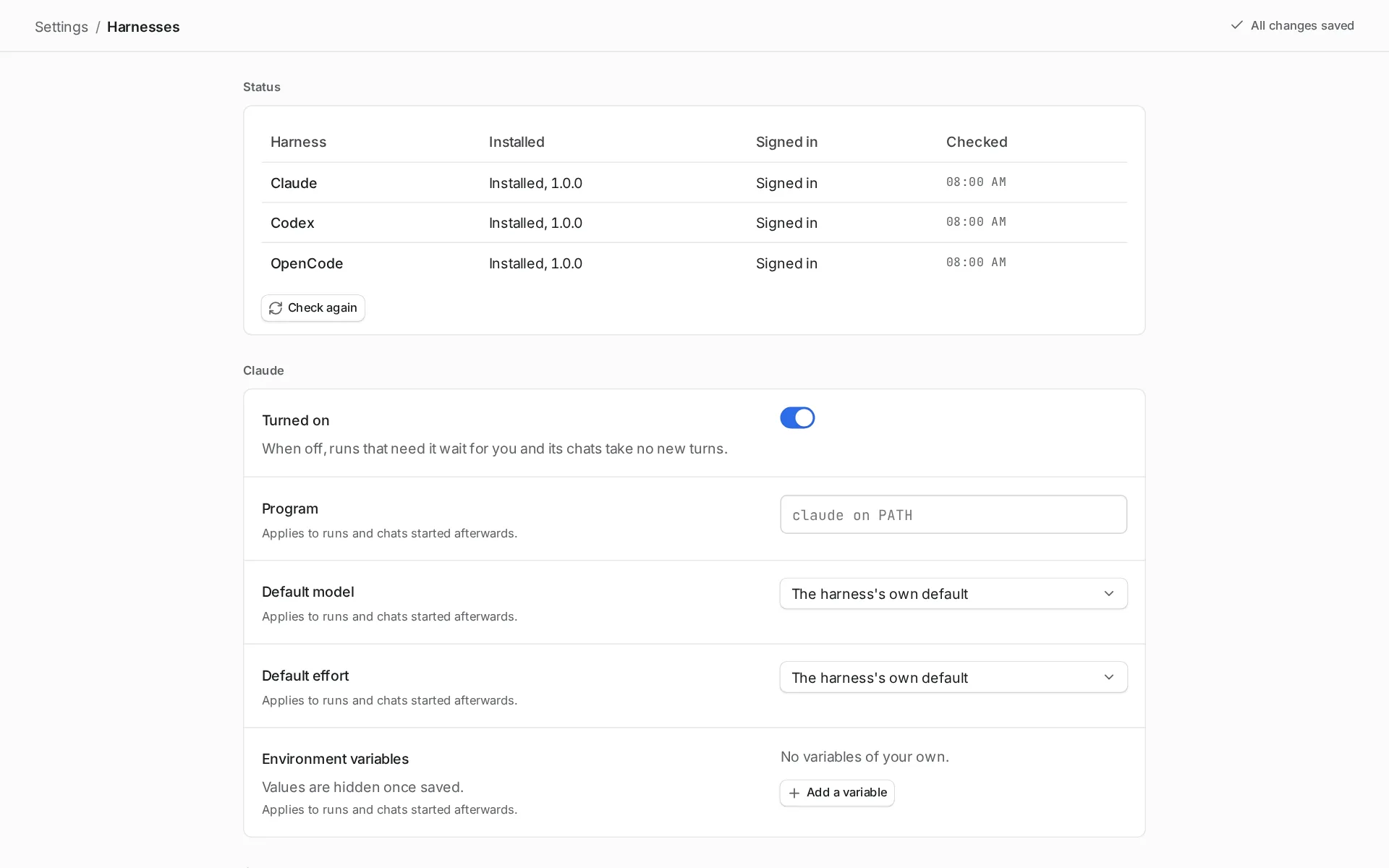
Section titled “See a harness’s status”Open Settings > Harnesses. The status table shows, for each harness, whether it is installed, whether it is signed in, and when Orbital last checked. Choose Check again after you install or sign in. Orbital also checks every five minutes.
| Status | Meaning |
|---|---|
| Installed, version | Orbital found the program and it answered. |
| Not installed | Orbital found the program neither at the path set in Settings nor on the PATH of your login shell. The message gives the command to install it. |
| Too old, version | The program is older than the oldest version Orbital works with. The message names that version and the command to update it. |
| Could not start | The program is there, but it failed to start. |
| Off | You turned the harness off. |
| Signed in, Signed out, Sign-in not reported | What the harness says about its login. |
Pickers add the reason after a harness’s name, such as “(turned off)” or “(not installed)”.
Harness settings
Section titled “Harness settings”Each harness has its own group in Settings > Harnesses: Turned on, Program, Default model, Default effort and Environment variables. See Settings.
Differences between harnesses
Section titled “Differences between harnesses”Claude Code works in plain folders as well as Git repositories. Claude has usage, rate and weekly limits. When it reaches one, the step stops as out of quota.
Codex refuses to start in a folder that is not a Git repository. So a step on Codex needs its primary folder to be one. See plain folders and Git.
Codex reads files through commands. A Codex step with Read files but not Run commands keeps commands available for reading in a read-only sandbox that prevents writes. See Tool access.
OpenCode works in plain folders as well as Git repositories.
To use OpenRouter models through OpenCode, export OPENROUTER_API_KEY in the shell that starts Orbital, then restart it.
A missing or switched-off harness
Section titled “A missing or switched-off harness”A step whose harness is turned off, not installed, or not set up does not fail. The run stops on that step with the reason on the step. It is Paused, and its badge reads “Waiting on you”. To carry on:
-
Fix the cause.
Install the harness, sign in, or turn it back on under Turned on in Settings > Harnesses.
-
Check again.
Choose Check again in Settings > Harnesses.
-
Resume the run.
Open the run and choose Resume.
Or move the run to a harness that works.
A harness that is off takes no new turns anywhere. Runs that need it stop, and its chats take no new turns.
When a harness runs out of quota
Section titled “When a harness runs out of quota”Claude and other harnesses have usage, rate and weekly limits. When a harness reaches one, the step stops with an “out of quota” reason. The reason names the harness and, when it is known, when the quota resets. The run is Paused, with the badge “Waiting on you”.
You can then switch the run’s harness yourself. Or let the Supervisor do it with a quota fallback.
Switch a run’s harness
Section titled “Switch a run’s harness”You can move a stopped run to another harness and retry its current step there. Finished steps, context and file changes stay. Switch a run’s harness gives the steps and what carries over.
A step that goes silent
Section titled “A step that goes silent”A turn that writes nothing for the Stalled turn limit is stopped and started again in the same session. The limit is five minutes unless you change it in Settings > General. After two such restarts in one step, the run is Paused, with the badge “Waiting on you”.
Quick reference
Section titled “Quick reference”| Claude Code | Codex | OpenCode | |
|---|---|---|---|
| Install | npm install -g @anthropic-ai/claude-code@latest |
npm install -g @openai/codex@latest |
npm install -g opencode-ai@latest |
| Sign in | claude |
codex login |
opencode auth login |
| Oldest version Orbital works with | 2.1.280 | 0.156.0 | 1.18.0 |
| Plain folders | Yes | No, the primary folder must be a Git repository | Yes |
Related
Section titled “Related”- Switch a run’s harness: retry a step on another harness, by hand or by quota fallback.
- Use different models in one workflow: give steps their own harness, model and effort.
- Install Orbital: install and sign in to a harness.
- Settings reference: every harness setting.